October 21, 2026
How REA Actually Works: An AI Agent, Three Decompilers, and a Lot of Plumbing
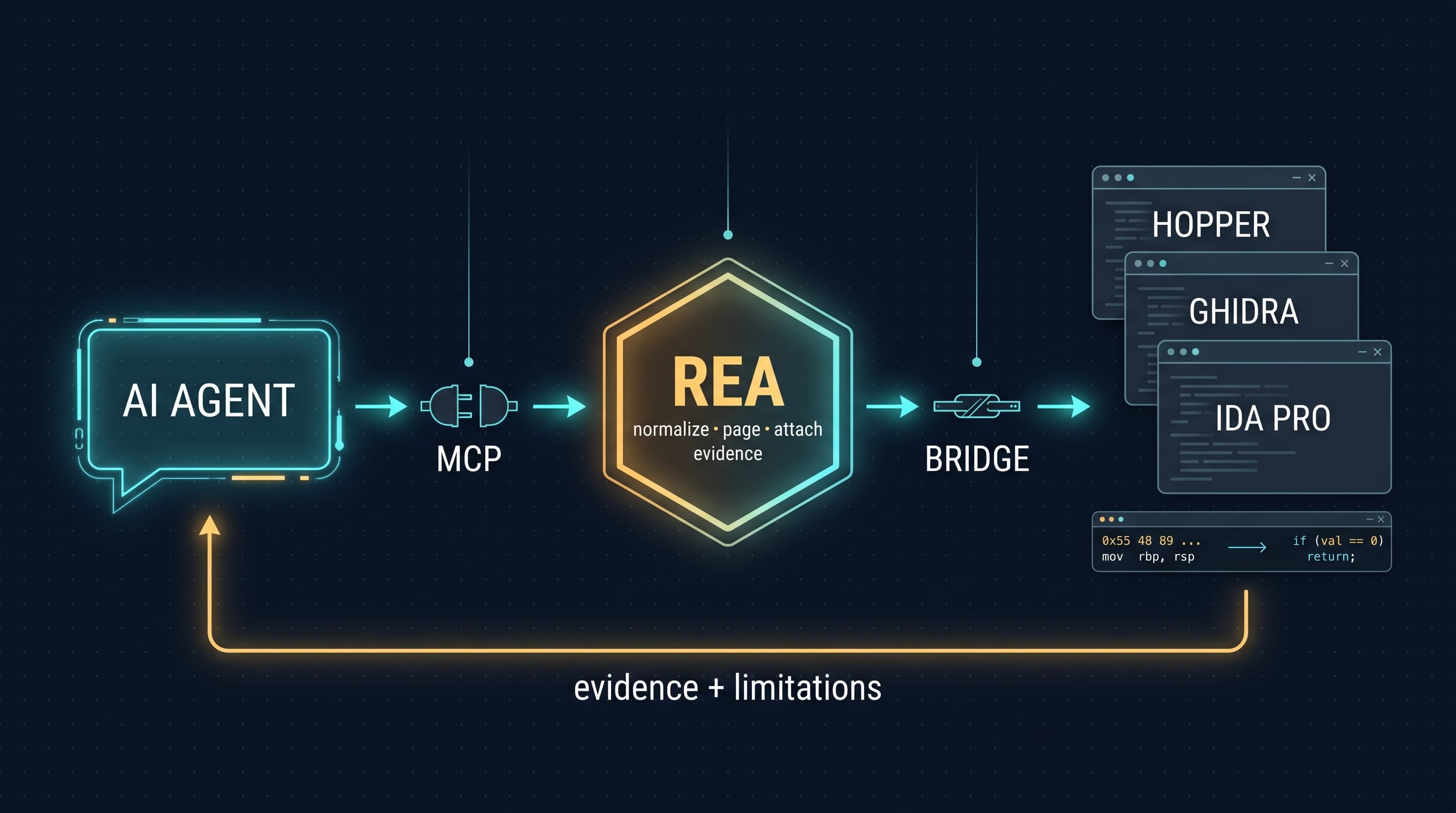
A few weeks ago I kept seeing REA (Reverse Engineer Anything) all over my feed, usually with a tagline that made it sound like an AI that can crack open any app. I wanted to know what is really going on underneath, so I read the repo, the README, and a few write-ups. This post is what I learned, written the way I wish someone had explained it to me: basics first, then the big picture.
One honest note before we start. I read the main README and third-party coverage, but I did not read the bridge code itself. Where I am inferring how something works, I say so.
Part 1: The vocabulary
If you already know reverse engineering, skip ahead. If you are a junior like me on low-level topics, these terms are the whole foundation.
Binary. A compiled program. The source code is gone, and what remains is machine code, the raw instructions a CPU runs.
Disassembler. A tool that translates machine code into assembly, a human-readable but very low-level form (move this value, jump to that address).
Decompiler. A tool that goes one level up and turns assembly into C-like pseudocode. It is never a perfect reconstruction, because names, comments and structure are lost at compile time, but it is far easier to read.
Ghidra, Hopper, IDA Pro. The three big desktop tools for this job. Each does disassembly and decompilation, and each also tracks symbols, strings and cross-references (the answer to "who calls this function?"). You open a binary, they run an analysis pass, and they keep the results in an internal database you can explore.
MCP (Model Context Protocol). A standard way for a program to tell an AI agent "here are tools you can call." Each tool has a name and a typed input schema. The agent's model decides when to call one, the MCP server runs it, and the result goes back to the model.
Provider. REA's word for the engine that does the real analysis, such as Hopper, Ghidra or IDA.
Part 2: What REA actually is
REA is a local MCP server and command-line tool written in TypeScript. The important thing to understand is that it does not decompile anything itself for native binaries. You bring your own Hopper, Ghidra or IDA, and REA drives them on the agent's behalf.
That means REA is not competing with those tools. It is making them callable by an AI agent, which they were never designed for, since they are GUI apps built for a human clicking around.
It is not purely a wrapper, though. The README lists several formats REA analyzes with its own built-in static parsers, with no external engine needed: Go binaries, .NET assemblies, Unity IL2CPP metadata, Godot archives, model files like GGUF and safetensors, and JavaScript and Electron apps. The provider model applies mainly to deep native analysis.
Part 3: One request, end to end
Suppose you tell your agent: "Understand how search works in the Notes app, show me the evidence, and build a similar feature for my project." Here is the chain of events.
1. Setup. Running npx rea-agents setup registers REA's MCP server with your agent (Claude Code, Codex, Cursor, Gemini CLI and others) and installs a skill, which is a written set of instructions for how to investigate. Setup shows you the proposed changes and backs up existing configuration first.
2. The tool call. The agent's model picks a REA tool, for example one that lists functions or searches strings, and sends the call over MCP. Because it is a local server over standard input and output, REA runs as a child process on your machine. The README says analysis runs locally; your agent and its model provider see the tool results, and the provider's own data policy applies to those.
3. Provider launch. If the task needs native analysis, REA starts the provider, loads the binary and lets the provider run its analysis. On large binaries this is slow, which is why the README documents startup timeout settings for Hopper and Ghidra.
4. The bridge. The README includes a screenshot of REA launching its analysis bridge inside Hopper. My inference, not something I verified in code, is that this bridge is a small piece of code running inside the provider, using whatever automation hooks that tool offers, that takes commands from REA and returns data. The bridge/ folder in the repo is where to confirm this.
5. Normalizing. Hopper, Ghidra and IDA each have different data models and output formats. REA converts what they return into a consistent result format, with the evidence behind each finding and the limitations of each conclusion.
6. Paging. Decompiler output can be enormous. The skill instructs agents to work summary-first and page through evidence, so the model's context window is not flooded with thousands of lines it does not need.
7. The loop. The agent reads the evidence, asks follow-up questions (show me this function's pseudocode, what references it, what strings are near it), forms a hypothesis, writes an implementation and tests it. Then it goes around again.
Part 4: Why the verification step matters
The most convincing thing in the README is not the setup, it is the showcases. In the DX-Ball example, the agent follows a sound call into a helper that converts a position into stereo pan, reads the instructions, and rewrites the incomplete pseudocode as C. According to the README, that reconstruction passes 3,205 test cases against the original x86 code and reproduces all 63 compiled function bytes.
That is a different category of result from "the model says it understands this function." The claim is checkable. The other showcases, tracing the clipboard bridge in Notion's Electron app and recovering a bullet-ring calculation from a 16-bit DOS game, follow the same pattern of evidence first, conclusions second.
Part 5: Is it "just a wrapper"? And what about the tool calling?
For native analysis, mostly yes, and I think that is a strength rather than a criticism. Ghidra, Hopper and IDA represent decades of work on the hard problem. Rebuilding that would be pointless. The value REA adds is everything around the engines: sessions, normalization, evidence tracking and a consistent interface.
As for the impression that it works because of near-perfect tool calling, I think that credits the wrong layer. The model does the calling. What REA does is make calls hard to get wrong:
- Typed tool schemas, so the model cannot easily pass nonsense.
- Bounded and paged outputs, so results fit the context window.
- Evidence and limitations attached to every result, so the model is less likely to overclaim.
- A workflow skill that tells the agent how to investigate, instead of leaving it to improvise.
The repo also contains mutation-testing and tool-semantics test configurations. That suggests the authors test whether tool behavior is correct, not only whether it runs, which would explain a lot of the reliability people report. As for how much of the project was written with AI assistance, I cannot verify that from what I read, and I would rather not guess.
Part 6: Responsible use
The project is explicit that it is for lawful research, education, interoperability, software preservation, and analysis of software you own or are authorized to examine. You also need to obtain commercial tools like IDA Pro and Hopper legally under their own licenses, because REA grants no license or activation for them. Reverse engineering is a legitimate and valuable skill, and it stays that way when you stay inside those lines.
What I took away
The interesting engineering in agent tooling is rarely a smarter model. It is the interface between the model and the world: tools that are hard to misuse, outputs sized for a context window, and results that carry their own evidence so a human can check them. REA is a good case study in all three.
If you want to go deeper, start with the project's architecture map and its MCP contracts document in the docs/ folder, then read the bridge/ and src/ directories. That is where I am heading next.
Repo: Github Repo
Setup, guides and case studies: rea.tools